Turn Every Workday Into Clear Decisions
Dayspan's workforce intelligence platform shows where time goes, what gets done and what it costs, so you can raise output, cut wasted hours and run payroll on numbers you trust.
Free for up to 5 people. No credit card required.
 Windows
 macOS
 Linux
Trusted by fast-growing teams
Three ways Dayspan makes a company run better
Measure capacity, keep delivery on track and protect your margin, all from one verified record of work.
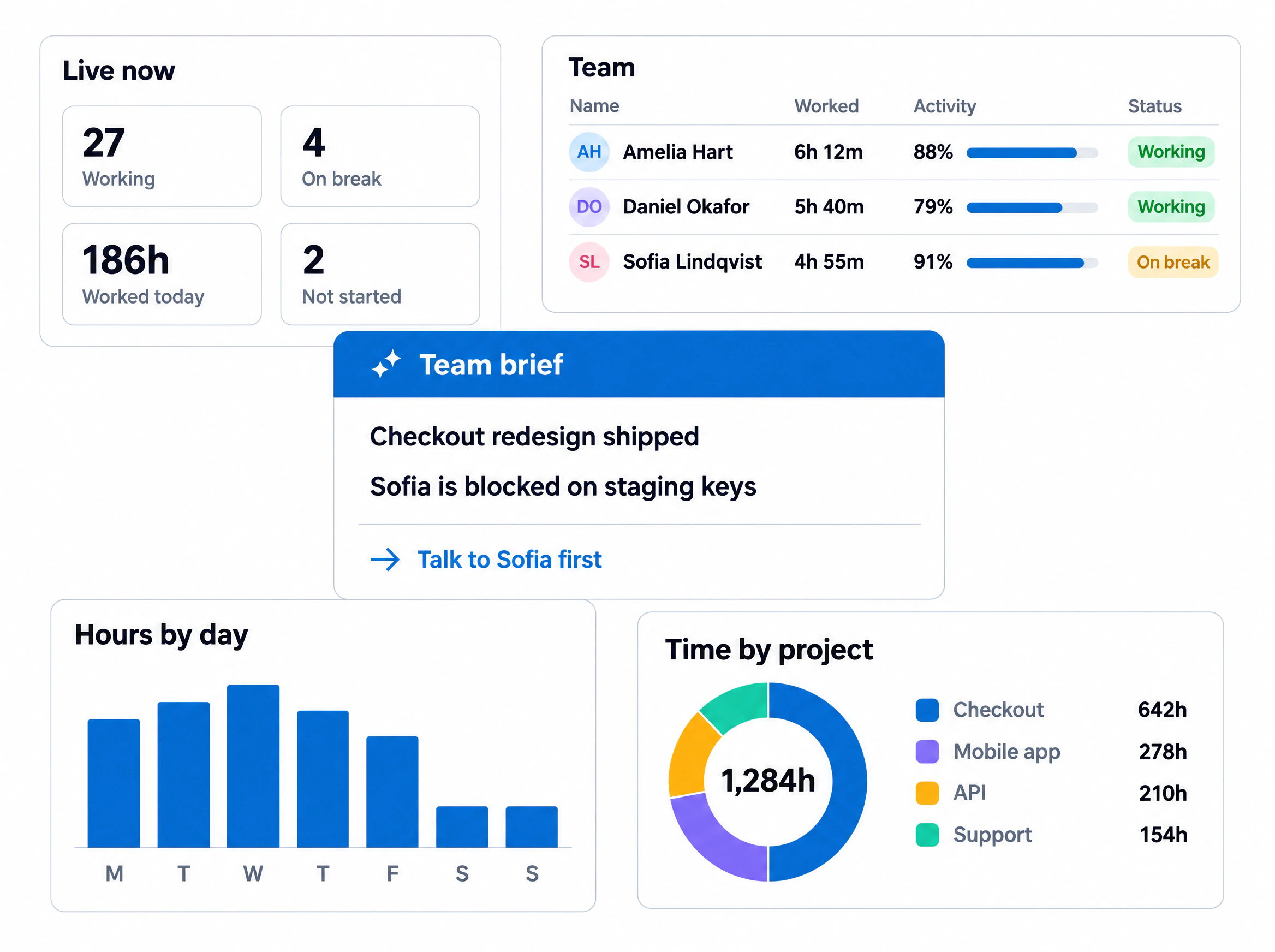
Recover the hours your team loses every week
Most teams run well below their real capacity and never see where the gap is. Dayspan measures it by person, team and project, so you can add output before you add headcount.
- Utilization. Productive hours against paid hours, updated live
- Capacity planning. Who is stretched and who has room, across every team
- Tool and AI usage. The apps that move work forward, and the ones that stall it
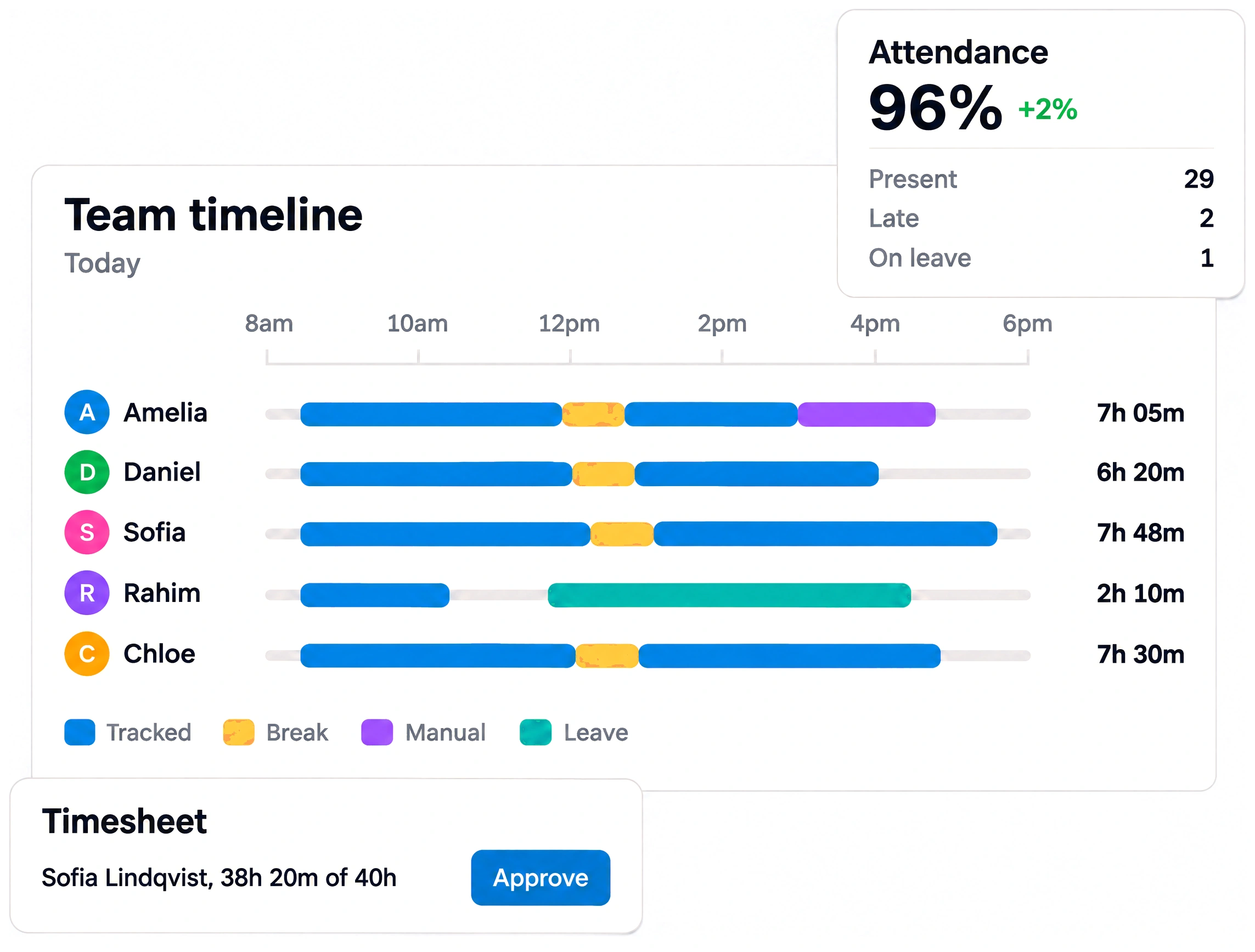
Answers for every team that runs the business
Output, hours and cost across the company, in one view.
Workload by team and project, so headcount decisions use real hours.
Attendance, leave and payroll from one record employees can see too.
Cycle time, blockers and focus hours, next to commits and tickets.
From data to decisions, automatically
Dayspan AI turns plans, hours and tickets into clear next steps: what to fix, who needs help and where time is leaking.
Bring your work data into any AI assistant
The Dayspan MCP server lets Claude, ChatGPT and Cursor answer questions about hours, workload and blockers, with your existing permissions. Included on every plan.
Explore the MCP server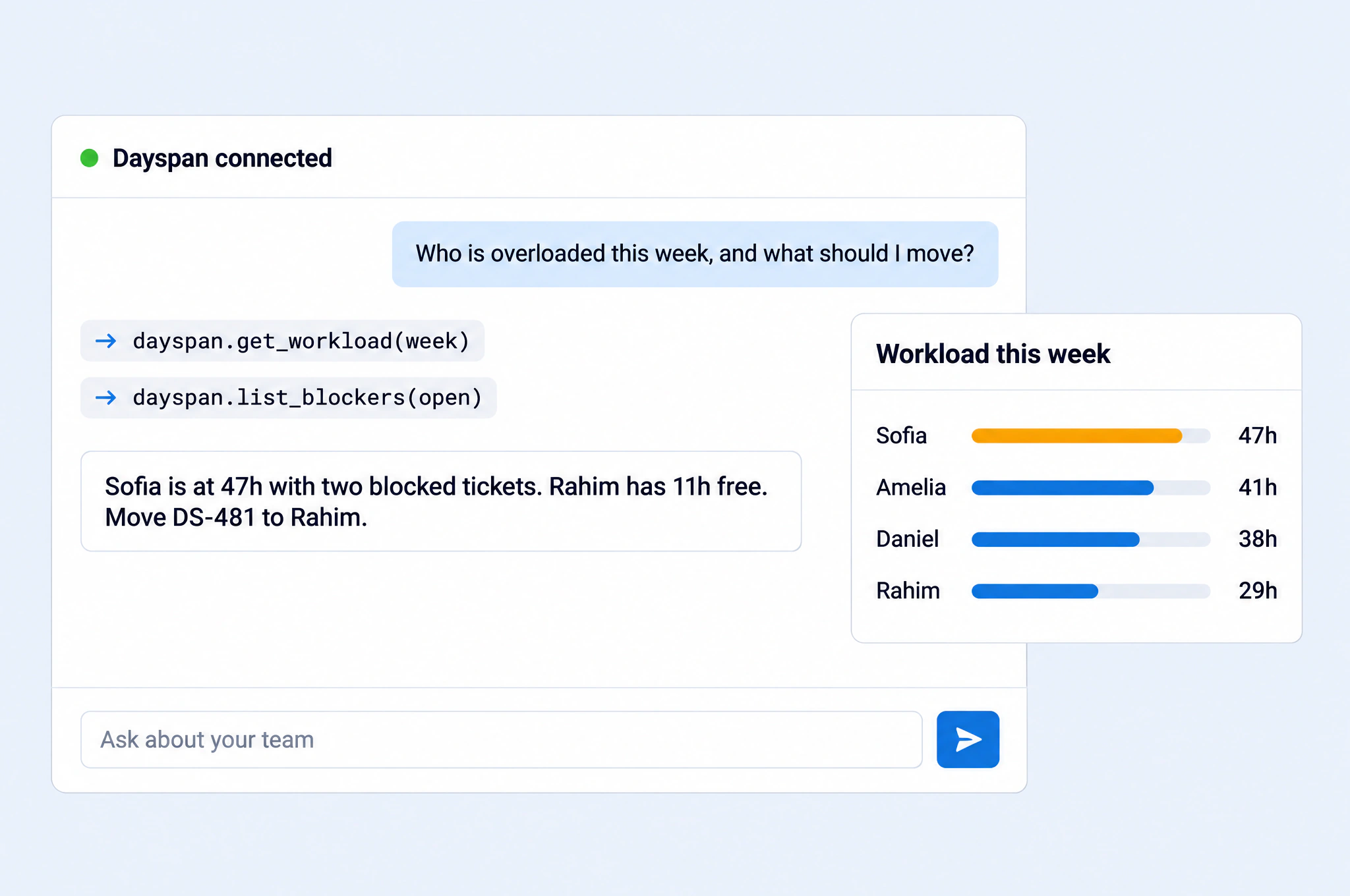
Measure AI adoption across your team
See which AI tools people use, how much, and where adoption lags, so AI spend turns into output.
Explore AI adoption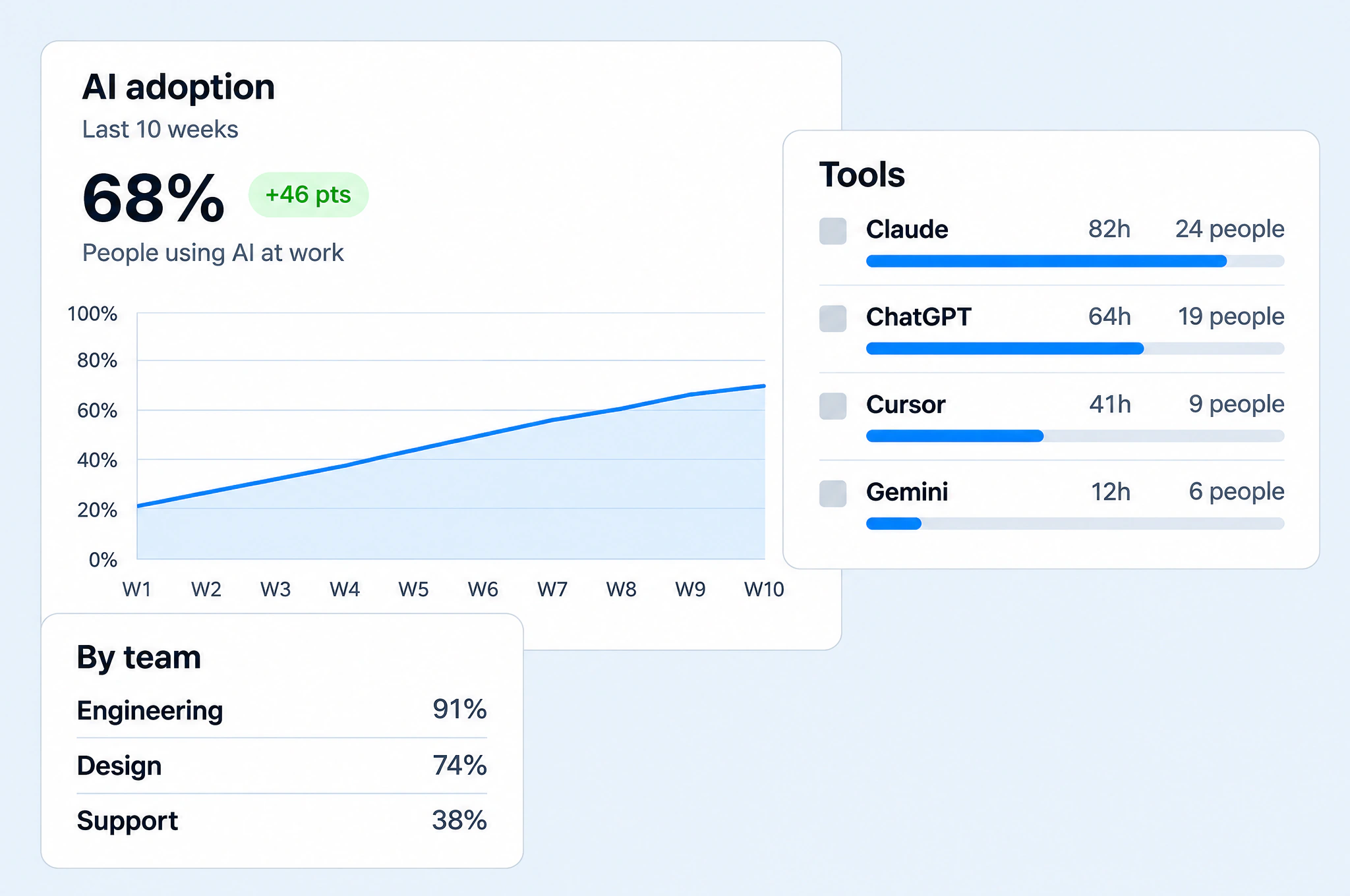
Daily team brief
What shipped, what is stuck and who to talk to, before your first meeting.
1:1 prep
A clear read of each person's plans and delivery, written for you.
Traceable numbers
Every insight links back to tracked hours. Nothing is estimated.
From install to insight in a day
No setup project and no training. Most teams see their first insights the next morning.
Install the app
A lightweight desktop app for Windows, macOS and Linux.
Capture the workday
Hours, attendance, apps and plans, recorded automatically.
See how work happens
Utilization, output and cost by person and team.
Act and improve
Fix bottlenecks, rebalance workload and track the result.
Connect the tools your team already uses
Sync projects, tickets, calendars, chat, payroll and AI tools, so every metric reflects the full picture.
 Jira
 Trello
 Asana
 ClickUp
 Linear
 Notion
 Basecampmmonday.com
 Slack
 Microsoft Teams
 Discord
 Zoom
 Google Meet
 GitHub
 GitLab
 BitbucketAAzure DevOps
 Figma
 Google Calendar
 OutlookJiraTrelloAsanaClickUpLinearNotionBasecampmmonday.comSlackMicrosoft TeamsDiscordZoomGoogle MeetGitHubGitLabBitbucketAAzure DevOpsFigmaGoogle CalendarOutlook
 Google Drive
 QuickBooks
 Xero
 Gusto
 Deel
 Stripe
 Wise
 PayPal
 Zendesk
 Intercom
 HubSpotSSalesforce
 ClaudeCChatGPT
 GeminiCCursor
 Zapier
 BigQuery
 Snowflake
 Google SheetsGoogle DriveQuickBooksXeroGustoDeelStripeWisePayPalZendeskIntercomHubSpotSSalesforceClaudeCChatGPTGeminiCCursorZapierBigQuerySnowflakeGoogle Sheets
Tickets update themselves
Start work and the Jira ticket moves to In progress. Finish and it moves to Done.
Standups post to Slack
Plans and wrap-ups land in the channel your team already reads.
Leave on the shared calendar
Approved time off and holidays show up for everyone, automatically.
Transparency built in
Employees see the same data you do, you control what is captured, and Dayspan holds up to HR, legal and security review.
Everyone sees their own data
Hours, activity and screenshots are open to the person they belong to.
You decide what is captured
Turn screenshots on or off, blur them, or set rules per person.
Offline is never held against anyone
A lost connection is recorded as offline, not as time away.
Permissions on every page
Role-based access decides who sees what, everywhere in Dayspan.
More than time tracking
Trackers count hours. Dayspan connects hours to output and cost, so you can improve how work gets done.
Based on each product's public website, November 2026.
Measurable results from real teams
“We stopped asking people what they did today. The day is simply there, and the team trusts it because they see the same thing we do.”
“Payroll used to be a spreadsheet and two anxious days. Now the hours are already approved and the payslips write themselves.”
“Tickets move on their own when someone starts work. I get a brief every morning that tells me exactly who to talk to.”
Replaced our tracker, our standup bot and our payroll sheet in a week.
Everyone can see their own data. That changed the whole conversation.
It quotes what people wrote and tells me what does not add up.
Invited 60 people on a Monday morning. Had a full day of data by Tuesday.
Billable hours come with proof. Invoices go out without the back and forth.
Half our team is on patchy connections. Nothing is ever lost.
Replaced our tracker, our standup bot and our payroll sheet in a week.
Everyone can see their own data. That changed the whole conversation.
It quotes what people wrote and tells me what does not add up.
Invited 60 people on a Monday morning. Had a full day of data by Tuesday.
Billable hours come with proof. Invoices go out without the back and forth.
Half our team is on patchy connections. Nothing is ever lost.
Pricing that scales with your team
Start free for up to 5 people. Upgrade for AI, payroll and the full platform.
For small teams getting their day in order.
- Automatic time tracking
- Attendance and timesheets
- Leave and manual time
- Reports and exports
- Desktop app on every platform
Everything, for teams that run on Dayspan.
- Everything in Free
- Standups, reviews and Dayspan AI
- Screenshots, apps and websites
- Projects, tickets and integrations
- Payroll, expenses and documents
- MCP server
For larger companies with their own rules.
- Everything in Pro
- Single sign-on and provisioning
- Private hosting options
- Dedicated success manager
- Custom data retention
Frequently asked questions
Still have questions? Talk to our team
No. Tracking is how the day gets recorded. What you get from it is attendance, timesheets, standups, reviews, project time and payroll, all from the same record, with AI that reads it for you.
Start making decisions on real data
Free for up to 5 people. No credit card required. Set up in minutes.